Is There a Better File Manager Than Finder?
An honest look at Finder alternatives for Mac in 2026: ForkLift, Path Finder, Commander One, QSpace, Marta and Homy, what each is best at, and who should stick with Finder.

· 10 min read
Finder is one of those apps everyone uses and almost nobody loves. It’s been the Mac’s file manager since 1984, and while it has picked up tabs, tags and Quick Look along the way, plenty of people still go looking for something better.
So is there one? Yes, but “better” depends entirely on what bugs you about Finder. Someone who moves files between servers all day needs a very different app from someone who just can’t find last week’s screenshot. Here’s an honest look at the main options in 2026, grouped by what they’re best at.
What Finder gets right (and wrong)
Before replacing anything, it’s worth being clear about what Finder already does well:
- It’s fast, free, and deeply tied into macOS: iCloud Drive, AirDrop, tags, Quick Look and Spotlight.
- It handles basics like batch renaming and Smart Folders better than most people realise.
- It never needs updating, licensing or permissions set up.
And here’s what people usually go looking for elsewhere:
- Two panes side by side for copying between folders without juggling windows.
- Connections to servers and cloud storage such as SFTP, S3 or Google Drive, browsed like local folders.
- Consistent views. Finder’s habit of forgetting your view settings drives people up the wall. (There is a fix: making list view the default.)
- Better search. Finder search is capable, but the interface is clunky. Here’s how it compares to Spotlight.
- Seeing what you have. Finder shows folders, not your stuff. It can’t show you all your videos, or what’s using up space, without some digging.
The apps below each fix a different part of that list.
ForkLift: the best all-rounder for moving files
Best for: anyone who copies files between folders, servers and cloud storage. Price: from $19.95 one-time (one Mac, a year of updates included), $29.95 for a family license.
ForkLift, from BinaryNights, is the app most people end up with when they want a “proper” file manager. It has two panes, tabs and workspaces, and it connects to SFTP, FTP, WebDAV, SMB, Amazon S3, Google Drive and Dropbox, so remote folders work just like local ones. It can compare and sync folders, edit remote files in your own editor, show Git status, and remove apps along with their leftover files.
It still looks and feels like a Mac app, which makes the switch easy. The licence is a one-time purchase that includes a year or two of updates; after that you keep the version you have, or buy again for newer ones.
Skip it if you rarely touch servers or cloud storage. Most of what you’d be paying for would go unused.
Path Finder: the most customisable
Best for: power users who want to replace Finder as completely as possible. Price: paid, sold as a subscription or as a fixed-term license; check Cocoatech’s site for current pricing.
Path Finder has been around for over two decades and has a feature for almost everything: dual panes, a built-in Terminal, a Drop Stack for collecting files from different places before moving them, folder size calculations, hidden-file toggles, and modules you can arrange around the window. If you like to tweak, it’s the deepest option here.
Skip it if you want something simple. All that flexibility comes with a busier interface and a learning curve, and the pricing model has changed a few times over the years.
Commander One: the free dual-pane option
Best for: people who grew up on Total Commander or Norton Commander. Price: free version available; Pro is $29.99 one-time for a personal license.
Commander One, from Eltima, is a classic two-pane, keyboard-friendly file manager. The free version covers the dual-pane basics and is worth trying first. Pro adds the extras: connections to FTP and cloud storage, mounting phones and other devices, archive handling and more. Note that the Mac App Store version is a bit more limited than the one from Eltima’s own site.
Skip it if you don’t like the commander style. It feels more like a power tool than a Mac app.
QSpace Pro: up to four panes
Best for: people who work across many folders at once. Price: paid, available on the Mac App Store and from the developer; check for current pricing.
QSpace Pro is a lightweight native app whose standout trick is layout: one, two, three or four panes, side by side or stacked, each with its own view. It also handles tabs, remote connections and batch operations, and stays quick even in big folders.
Skip it if you only ever need one or two panes. ForkLift does two panes with a more polished feel.
Marta: free, fast and keyboard-first
Best for: developers and keyboard fans who want speed for free. Price: free.
Marta is a native, two-pane file manager that’s quick to open and nicer to look at than most commander-style apps. It’s highly configurable through settings files and supports themes and plugins, which developers appreciate.
Skip it if you prefer clicking through settings to editing config files, or need cloud and server connections built in.
Homy: for finding and tidying, not moving
Best for: people whose problem is “where is that file?” or “what’s filling up my Mac?”. Price: $19₹1,799 one-time, no subscription.
Homy takes a different approach from everything above. Instead of a better way to browse folders, it shows your Mac’s images, videos, music, documents, archives and apps as big, clear thumbnails, wherever they’re saved. You find things by typing what you mean, like “pdfs from last week” or “big videos”, and Homy turns that into filters you can see and adjust.
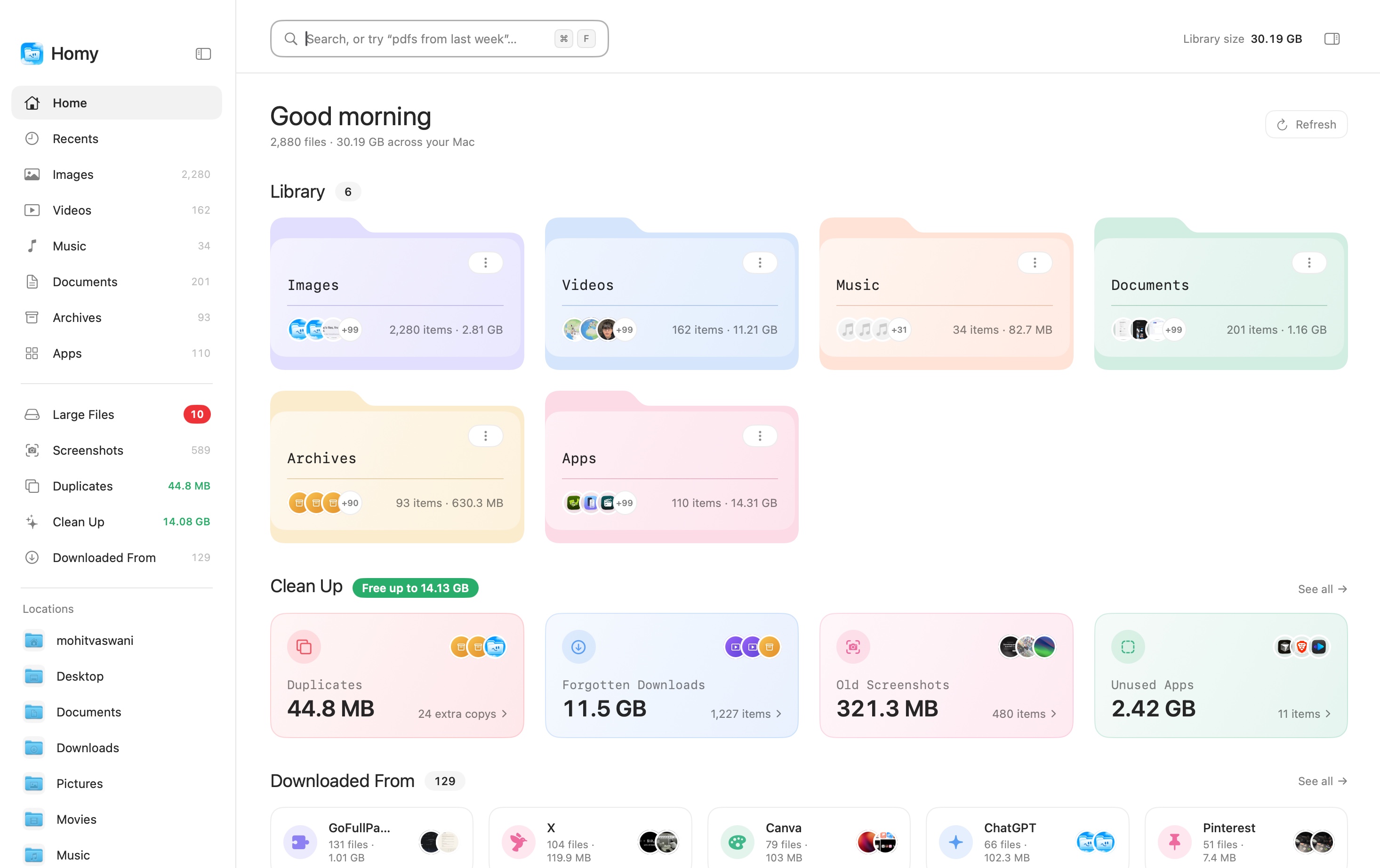
It also covers things the other apps here don’t:
- Text inside screenshots and images is searchable, and you can copy it out of several images at once.
- Downloaded From groups every download by where it came from: Gmail, Slack, ChatGPT, Canva or any website.
- Duplicates and Clean Up find identical files, look-alike photos, old .dmg installers, forgotten downloads and unused apps, and only ever move things to the Trash.
- Quick Search opens from any app with
⇧⌘Space.
Everything runs on your Mac; your files are never uploaded. Homy works alongside Finder rather than replacing it, with “Show in Finder” one click away.
Skip it if you need two panes or server connections. Homy doesn’t do FTP, and it isn’t trying to be a commander-style tool. Plenty of people pair it with ForkLift or plain Finder.
Quick comparison
| App | Best at | Panes | Servers & cloud | Pricing |
|---|---|---|---|---|
| Finder | Built-in basics, iCloud, AirDrop | 1 | SMB and iCloud | Free with macOS |
| ForkLift | Moving files, remote servers, sync | 2 | Yes, many | One-time, from $19.95 |
| Path Finder | Deep customisation | 2 | Mounted drives | Subscription or term license |
| Commander One | Classic commander workflow | 2 | Pro only | Free, Pro $29.99 one-time |
| QSpace Pro | Multi-folder layouts | Up to 4 | Yes | Paid |
| Marta | Speed and keyboard control | 2 | Not built in | Free |
| Homy | Finding files, search in images, cleanup | 1, by file type | No | One-time, $19₹1,799 |
Who should stick with Finder
If you mostly open files from apps, save to a handful of folders and rarely move things around, Finder is fine, and a few settings make it a lot better:
- Turn on the path bar (
⌥⌘P) and status bar (⌘/) so you always know where you are. - Make list view the default so every folder shows dates and sizes.
- Open folders in tabs (
⌘T) and drag files onto a tab to move them, which covers most of what people want from two panes. - Learn Finder’s batch rename tool and Smart Folders.
- Clear out old installers now and then. Here’s why it’s safe to delete .dmg files.
How to choose
- You move files between places all day: ForkLift, or Commander One if you want to start free.
- You want to customise everything: Path Finder.
- You live in the keyboard and want free: Marta.
- You juggle lots of folders at once: QSpace Pro.
- You can never find anything, or your Mac is full: Homy.
Most of these apps offer a trial or a free version, so the best test is your own week of work. Try one for a few days, and if you still reach for Finder out of habit, that tells you something too.
Frequently asked questions
Can I replace Finder completely on a Mac?
Not completely. Finder is part of macOS and keeps running for the desktop, the Dock’s Downloads stack and many system dialogs. Apps like Path Finder and ForkLift can take over most everyday browsing, and some can be set as the default for opening folders, but Finder stays in the background.
What is the best free Finder alternative?
Commander One has a free version with a dual-pane layout, and Marta is free and fast if you like a keyboard-driven, two-pane file manager. Both are good for moving and copying files. For seeing and searching your files visually, look at Homy.
Is there a dual-pane Finder alternative for Mac?
Yes. ForkLift, Commander One, Marta and Path Finder all offer two panes side by side, and QSpace can show up to four. Finder itself does not, though you can get close by putting two Finder windows side by side.
Do Finder alternatives slow down a Mac?
Native apps like ForkLift, QSpace and Homy are light and don’t noticeably slow a modern Mac. Apps that build their own search index use some CPU and disk while they do it, usually only on the first run.